
BMW 3: Split cooling
Split cooling is a new development for the B46TU engine. This cooling concept is a modified version of which is already used in the N63TU2.
The Split Cooling function uses the electrical Split Cooling Valve (SCV), to enable on-demand decoupling of the crankcase from the coolant flow both in the warm-up phase and in partial load operation. In this situation, the coolant is exclusively routed through the cylinder head. The engine reaches its operating temperature more quickly in the warm-up phase, and can be operated with reduced emissions in partial load operation.
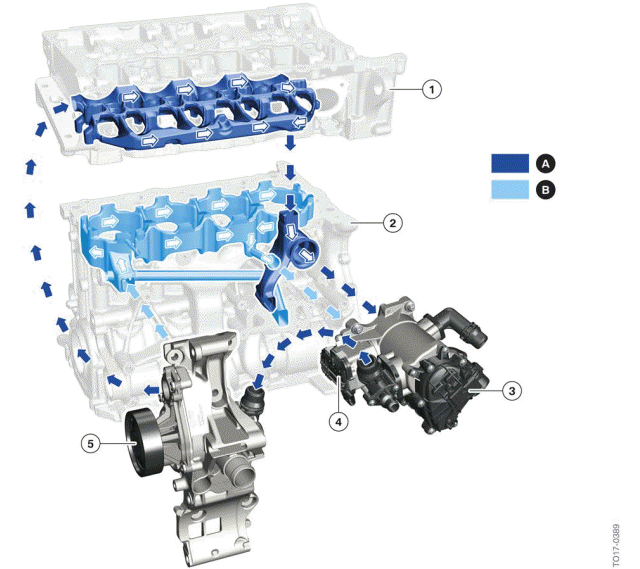
Coolant circuit
- High cooling requirement, Split Cooling cylinder head
- Low cooling requirement, Split Cooling crankcase
- Cylinder head
- Crankcase
- Heat management module
- Split Cooling Valve (SCV)
- Coolant pump
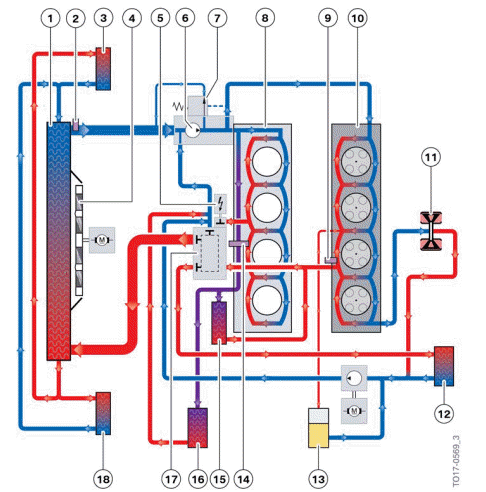
Cooling system overview
- Radiator
- Coolant temperature sensor radiator outlet
- Additional coolant radiator
- Electric fan
- Split Cooling Valve (SCV)
- Coolant pump
- Bypass valve
- Engine block (crankcase)
- Coolant temperature sensor engine outlet
- Cylinder head
- Exhaust turbocharger
- Heater core
- Expansion tank
- Component temperature sensor
- Engine oil/coolant heat exchanger
- Transmission oil/coolant heat exchanger
- Heat management module
- Additional coolant radiator
In Split Cooling, the cooling requirements for the crankcase and the cylinder head are managed by the electrical Split Cooling Valve (SCV). The fact that the engine reaches operating temperature more quickly again translates to substantial consumption and emission reductions.
To guarantee optimal heat distribution during the cylinder head and crankcase warm-up, the coolant supply for the cylinder head and crankcase is controlled individually. Controlled by the Digital Motor Electronics (DME), the coolant is distributed by the electrical Split Cooling Valve (SCV) on the heat management module in the warm-up phase such that substantially more coolant is available to the cylinder head than to the crankcase. Depending on the engine's operating condition, the Digital Motor Electronics (DME) controls the distribution of the coolant quantity to the cylinder head and crankcase as required.

A bleeding procedure must be carried out in accordance with the repair instructions and is required following a part exchange in the cooling system or refilling of the cooling system.
A video demonstrating the bleeding procedure can be found in the B46TU Engine on-line course (OL1837).
Filling without a vacuum filler device (watering can filling) is not approved There is a risk of engine damage in case of failure to comply The filling procedure must be observed Operation of the vehicle is not permitted without completing the entire filling procedure sequence.
There is a risk of functional limitations or overheating.
READ NEXT:
 Heat management module
The heat management module replaces the characteristic map thermostat.
Heat management module
Electrical Split Cooling Valve (SCV)
Coolant output towards the coolant pump
Electrical actuator
Rot
Operating strategy
The following graphic shows the positions of the rotary valve as the coolant
temperature increases:
Switching diagram heat management module
0% - Rotary valve closed
100% - Rotary valve open
Cold
Operating temperature
The positions of the rotary valve at engine operating temperature are shown
by area C of the heat
management module circuit diagram.
Operating temperature
The graphic shows control with the engine a
SEE MORE:
Introduction
The function of the brake system of the G20 PHEV is to decelerate the vehicle
safely under stable
conditions. Vehicle deceleration is made up of the following elements:
Conventional hydraulic braking
Regenerative braking
Thanks to regenerative braking it is possible to convert the kinetic
Activating/deactivating
popup windows
For some functions, popup windows are displayed
automatically on the Control Display.
Some of these popup windows can be activated
or deactivated.
Via iDrive:
1. "CAR".
2. "Settings".
3. "General settings".
4. "Pop-ups".
5. Select the desired setting.
The setting is stored for the driver prof
