
BMW 3: Direct rail
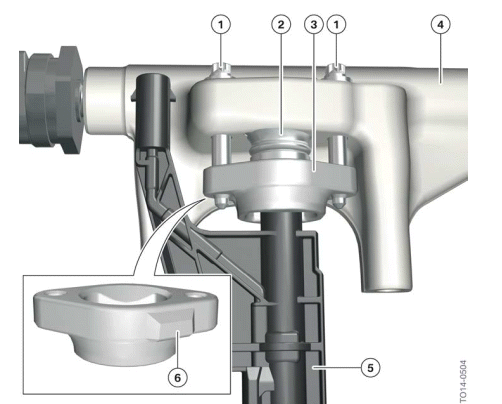
Injector mounting
- Mounting bolts
- Plastic sleeve (not required to be reinstalled after taken apart for service)
- Holding clamp with bayonet fitting
- Rail
- Solenoid valve injector
- Casting lug
The solenoid valve injectors are fastened to the holding clamp with a bayonet fitting. There is a plastic sleeve between the holding clamp and direct rail. This is not designed to collect escaping fuel. This is only used to support a helium leakage test during pre-assembly at the factory in order to check the tightness. After the initial assembly, this plastic sleeve is of no relevance to the engine operation. When the solenoid valve injectors are replaced, the plastic sleeves are no longer required and do not need to be reinserted.
The mounting bolts of the holding clamp must be replaced each time they are released.

The housing on the solenoid valve injectors is sensitive to excessive tensile forces and excessive rotational angles. When removing and installing the solenoid valve injectors, the procedure in the current repair instructions must be followed If the solenoid valve injectors are damaged, fuel may be discharged.
READ NEXT:
 Solenoid valve injector
Measures at the solenoid valve injector
The following graphic illustrates the differences between the HDVE5 and HDEV6
fuel injectors:
Solenoid valve injectors
Solenoid valve injector HDEV5
Soleno
Engine Electrical System
Digital Motor Electronics (DME)
DME 8 control unit
The Digital Motor Electronics (DME) is the computing and switching center.
Sensors on the engine
and the vehicle deliver the input signals and actu
SEE MORE:
Switching on/off and interrupting
cruise control
With steering and traffic jam
assistant: Assisted Driving
General information
This button is used to switch the
configured
function on and off.
The button can be used to set the
primarily
used function.
Set function
1. When the system is active,
press the
button repeatedly until the desired funct
Opening the trunk lid
General information
If you open the trunk lid via Comfort Access,
locked doors will not be unlocked.
To avoid locking the vehicle key in the vehicle,
do not place the vehicle key in the cargo area.
Safety information
Warning
Body parts can be jammed when operating the
trunk lid. There is a risk of
