
BMW 3: Technical data
The following table provides an overview of the technical data of the G20 PHEV 330e compared with the G20 330i and the F30 PHEV 330e.
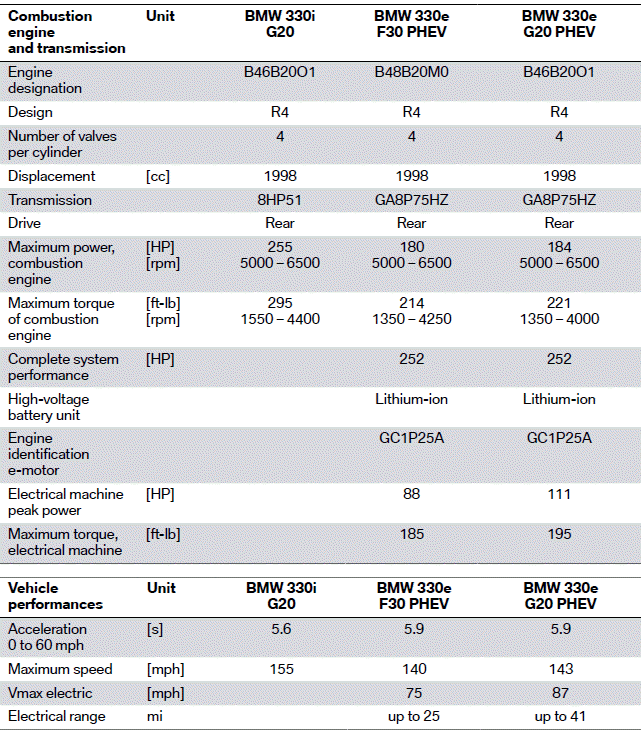
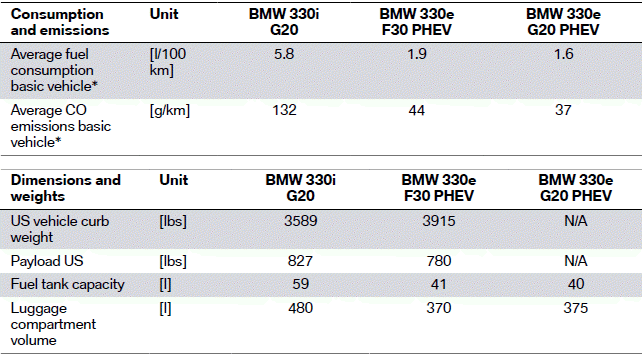
* Values may increased, depending on the equipment.
Equipment
The G20 PHEV and G20 differ not only in the technical data but also in the range of optional equipment offered. The most important optional equipment which is offered exclusively in the G20 is briefly summarized below:
- M sports suspension (OE 704)
- M Sport differential (SA 2T4)
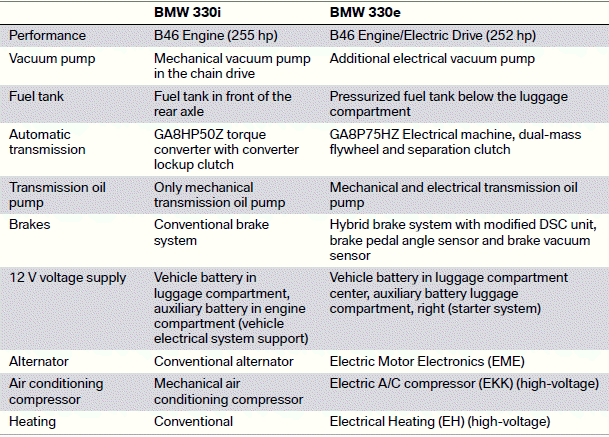
Overview of changes for the BMW 330i G20
Some components/systems were modified for use in the G20 PHEV. The most important changes are listed in the following table:
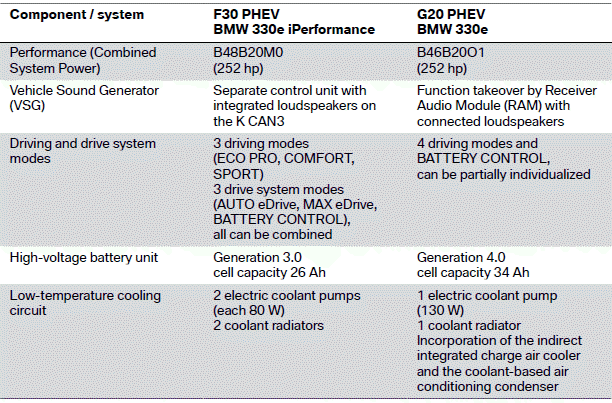
Overview of changes for the BMW 330e F30 PHEV
The following table provides an overview of the changes to the G20 PHEV in comparison with the F30 PHEV:
Detailed information on the alterations to the high-voltage battery unit can be found in the product information ST1927 High-voltage Battery SP41.
READ NEXT:
 Introduction
In the G20 PHEV, the B46B20O1 is an element of the BMW hybrid drive. The
4-cylinder engine,
which generates power of 135 kW (180 hp) and a maximum torque of 300 Nm,
guarantees mo
Fuel supply
For the operation of the combustion engine, the G20 PHEV is equipped with a
pressurized fuel
tank. As a result during purely electric driving it is guaranteed that the
gasoline fumes remain in
SEE MORE:
System overview
G20 PHEV, components of refrigerant circuit
Combined expansion and shutoff valve (interior)
Combined expansion and shutoff valve (high-voltage battery unit)
High-voltage battery unit
Refrigerant lines to high-voltage battery unit
Low-pressure connection (for drawing off, evacuating and f
Temperature
Concept
The automatic climate control achieves the set
temperature as quickly as possible, if needed, by
using the maximum cooling or heating capacity,
and then keeps it constant.
Adjusting
Press the upper or lower button
side to
set the desired temperature.
Via iDrive:
1. "CAR".
2. "Settings".
3
