
BMW 3: Interior
The interior equipment of the G20 PHEV also differs from the conventional G20 in various features.
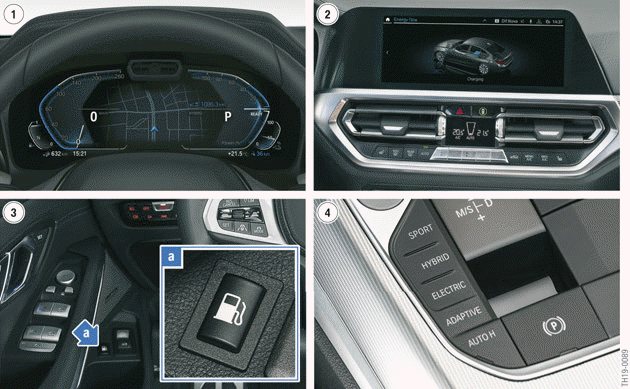
G20 PHEV interior identifying features
- Hybrid-specific displays in the instrument cluster (KOMBI)
- eDRIVE menus in the Central Information Display (CID)
- Refuelling button
- Driving Experience Control with the SPORT, HYBRID, ELECTRIC and ADAPTIVE driving modes
The hybrid-specific operating conditions and the state of charge of the high-voltage battery unit are displayed in the instrument cluster and if desired in the Central Information Display. The installation location of the refuelling button is in the front, bottom part of the door trim panel on the driver's side.
The interior space of the G20 PHEV remains unchanged compared with the G20. With the fuel tank in the luggage compartment, the luggage compartment capacity in the G20 PHEV is reduced by approximately 100 liters.
READ NEXT:
 Technical data
The following table provides an overview of the technical data of the G20
PHEV 330e compared with
the G20 330i and the F30 PHEV 330e.
* Values may increased, depending on the equipment.
Equipment
T
Introduction
In the G20 PHEV, the B46B20O1 is an element of the BMW hybrid drive. The
4-cylinder engine,
which generates power of 135 kW (180 hp) and a maximum torque of 300 Nm,
guarantees mo
SEE MORE:
Updating album information
To update this database, contact a dealer's service
center or another qualified service center or
repair shop.
Gracenote technology
Music recognition technology and
related
data is provided by Gracenote. Gracenote is the industry standard in music
recognition technology
and related content deliver
Setup assistant
The setup assistant is offered in new vehicles for
a limited period of time on the Welcome screen
to configure the most important settings for the
vehicle.
"Getting started" Select to start the set-up assistant.
The set-up assistant can be started via iDrive at
any time.
1. "CAR".
2. "Settings".
© 2019-2026 Copyright www.bmw3g20.com
