
BMW 3: Vehicle identification number
Engine compartment
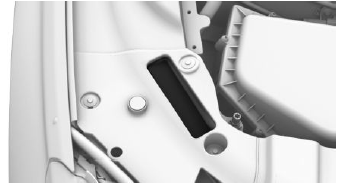
The vehicle identification number can be found in the engine compartment, on the right-hand side of the vehicle.
Windshield
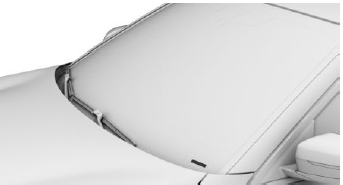
The vehicle identification number can also be found behind the windshield.
iDrive
It is also possible to display the vehicle identification number via iDrive.
Reporting safety defects
For US customers
The following only applies to vehicles owned and operated in the US.
If you believe that your vehicle has a defect which could cause a crash or could cause injury or death, you should immediately inform the National Highway Traffic Safety Administration NHTSA, in addition to notifying BMW of North America, LLC, P.O. Box 1227, Westwood, New Jersey 07675-1227, Telephone 1-800-831-1117.
If NHTSA receives similar complaints, it may open an investigation, and if it finds that a safety defect exists in a group of vehicles, it may order a recall and remedy campaign.
However, NHTSA cannot become involved in individual problems between you, your dealer, or BMW of North America, LLC.
To contact NHTSA, you may call the Vehicle Safety Hotline toll-free at 1-888-327-4236 (TTY: 1-800-424-9153); go to http://www.safercar.gov; or write to: Administrator, NHTSA, 400 Seventh Street, SW., Washington, DC 20590. You can also obtain other information about motor vehicle safety from http://www.safercar.gov.
For Canadian customers
Canadian customers who wish to report a safety-related defect to Transport Canada, Defect Investigations and Recalls, may call the toll-free hotline 1-800-333-0510. You can also obtain other information about motor vehicle safety from http://www.tc.gc.ca/roadsafety.
READ NEXT:
 General information
Media at a glance
You can use various media formats to call up the
content in the Owner's Manual. The following
Owner's Manual media formats are available:
Printed Owner's Manual.
Integrated Owner'
Integrated Owner's Manual
in the vehicle
Concept
The Integrated Owner's Manual specifically describes
features and functions found in the vehicle.
The Integrated Owner's Manual can be displayed
on the Control Display.
Selecting the Owner's
SEE MORE:
Lashing eyes in the cargo
area
General information
Attach load securing aids, such as lashing straps,
tensioning straps, draw straps or cargo nets, to
the lashing eyes in the cargo area.
Lashing eyes
There are four lashing eyes in the cargo area for
securing cargo.
Multi-function hook
General information
A multi-function hook i
Satellite radio
General information
Before a channel can be played, you must subscribe
to it via telephone. Several channels can
be combined into specified packages.
Managing a subscription
General information
In order to enable or unsubscribe from channels,
you must have reception. It is usually at its best
when y
