
BMW 3: High beams, headlight flasher, turn signal
BMW 3 Series G20 (2018-2026) Owners Manual / On the road / Driving / High beams, headlight flasher,
turn signal
High beams, headlight flasher
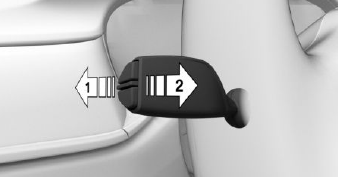
Push the lever forward or pull it backward.
- High beams on, arrow 1.
The high beams light up when the low beams are switched on.
- High beams off/headlight flasher, arrow 2.
Turn signal
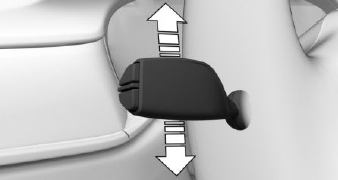
- On: press the lever past the resistance point.
- Off: press the lever past the resistance point in the opposite direction.
- Triple turn signal activation: lightly tap the lever up or down.
- Brief signaling: press the lever to the resistance point and hold it there for as long as you want the turn signal to flash.
Lights and lighting
Light functions
 Front fog lights.
 Lights off.
Daytime running lights.
 Parking lights.
 Automatic headlight control.
Adaptive light functions.
 Low beams.
 Instrument lighting.
 Right roadside parking light.
 Left roadside parking light.
READ NEXT:
 Wiper system
Switching the wipers on/off and
brief wipe
Switching on
Press the lever up until the desired position is
reached.
Resting position of the wipers: position 0.
Rain sensor: position 1.
Normal wiper
Climate control
Automatic climate control
Temperature.
Recirculated-air mode.
Maximum cooling.
AUTO program.
Air distribution, manual.
Switching off.
Defrost and defog the
windshield.
Rear window defroster.
Refueling
Refueling
Fuel cap
1. To open the fuel filler flap, press on the rear
edge, arrow. The fuel filler flap opens.
2. Turn the fuel cap counterclockwise.
3. Place the fuel cap in the bracket attached to
SEE MORE:
Introduction
The electrical machine in the G20 PHEV is a permanently excited synchronous
machine. It can convert
electrical energy from the high-voltage battery unit into kinetic energy, by
which the vehicle is driven.
Both electric driving up to approximately 87 mph (140 km/h) as well as support
o
Trunk lid
Trunk lid and doors
Depending on the vehicle equipment and country
version, this setting may not be offered.
Via iDrive:
1. "CAR".
2. "Settings".
3. "Key button settings".
4. Select the symbol.
5. Select the desired setting:
"Tailgate"
The trunk lid is opened.
"Tailgate and door(s)"
The t
© 2019-2026 Copyright www.bmw3g20.com
